 Eats365 Products
 Merchant Guide
 Modules
 Membership
 Integrations
 Hardware
 Staff Operations
 Roles & Permissions
 Payments
 Reports
 What’s New
 Release Notes
 Troubleshooting
 Simulators
 Glossary
 Troubleshooter
 System Status
Eats365 Products
Eats365 Expedite Display
Explore Expedite Display and its functionalities, and discover how it can enhance your restaurant's operations.
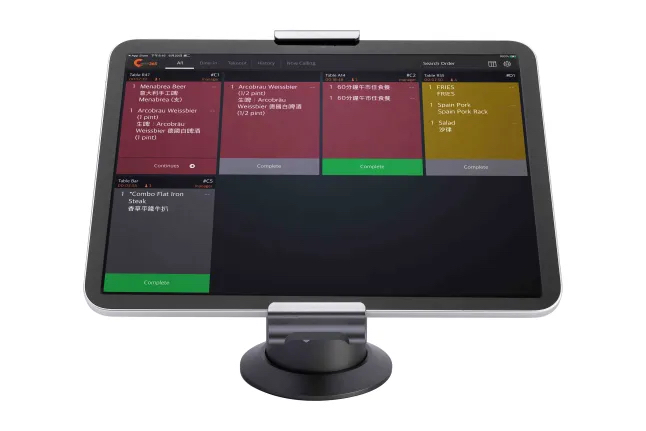
The Expedite Display is an interactive order management system that allows packers and expeditors to keep track of all completed orders that are ready to be served to customers. With the Expedite Display, you can make sure that your restaurant staff are up-to-date with all orders, so customers can receive their orders as soon as they’re ready.
Feature highlights
Paired with the Eats365 POS
The Expedite Display is synced with the Eats365 POS, ensuring that all orders placed and fired on the POS appear in real time on the Expedite Display. This helps packers and expeditors keep track of the status of all orders and keeps restaurant staff informed about which orders are ready to be served.
Modules that work with Expedite Display: Aside from the Eats365 POS, the Expedite Display also works closely with the Kitchen Display System to ensure that orders coming out of the kitchen get served to the customers quickly and efficiently. The Expedite Display can also connect to the eSignage to show orders that are ready for pickup. These Modules are essential in keeping your kitchen operations running smoothly.
Digitized order management
Instead of going through individually printed kitchen tickets to check orders, the Expedite Display allows packers and expeditors to manage all orders from a single display. From the Expedite Display, packers and expeditors can check order information, including a breakdown of items included in the order and the order or table number for each order.
Timer Alert
The Expedite Display includes a timer alert feature that notifies expeditors when an order has been in the system for too long. When an order has exceeded a set time limit, its color on the Expedite Display changes.
Automated Call for Pickup
The Expedite Display can be paired with a pager and a Pickup Display to quickly notify customers when their orders are ready for pickup.
Get started with the Expedite Display
To get you started with using the Expedite Display, here are some helpful links for you to explore: